

Some prerequisites:
- Jira & Confluence must be Server (no Cloud) because we use the HTML Macro to insert Javascript and Ajax
- Jira & Confluence must have SSO enabled (Single Sign On). For example, using Atlassian Crowd.
Recipe:
- Create a Confluence Server Page
- Add the HTML Macro and insert something like this:

The first Div is to create an input-box and a button to search some Jira ticket. Are the input params.
The second Div is to show the Jira ticket field information.
We can add a Javascript Ajax Rest web service query to obtain the Jira ticket info.
function getIssue(key)
{
	 AJS.$.ajax({
        url: "/rest/api/2/issue/" + key,
        type: 'get',
        dataType: 'json',
        async: false,
        success: function(data) {
            issue = data;
        }
     });

	$('#ticket').html($('#ticket').html() + "
<b>Summary:</b>" + issue.fields.summary );
	$('#ticket').html($('#ticket').html() + "
<b>Description:</b>" + issue.fields.description);
	return issue;
}
To finish we insert the last script tag HTML.

Then we publish the Confluence page and we start the tests! (very easy)
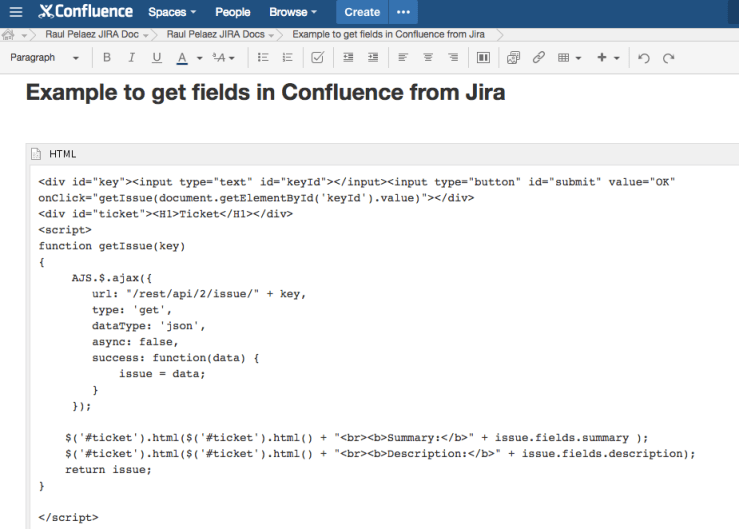
Making some tests….
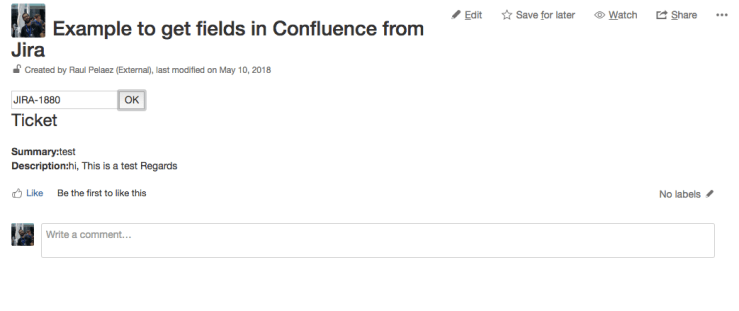
It works fantastic! 🙂 and also is permission-level protected!
That’s all!
By MrAddon.


 www.MrAddon.com ®: Jira & Confluence Administration Support Blog
One thought on “How to show Jira ticket fields in Confluence pages”